1/07/2024

Free Stuff: Maine Gives Away Community College Seats to Build Enrollment

If you can't sell your product, and the state will provide a subsidy, give it away! Maine has a Free Community College program that covers tuition and mandatory fees to attend Maine's community colleges. Graduates -- including non U.S. Citizens -- from a high school in Maine, from 2020 through 2025, are eligible to participate.    

Factors motivating the free community college program include declining community college enrollment and the belief that a college education is not "affordable."  (A third factor is the affinity of some in Maine's for social industrial complex projects). 

Community colleges have historically served three segments:
  • recent high school graduates aspiring to earn a certificate or a two year degree; 
  • recent high school graduates seeking to accumulate general education courses and then transfer to a four year institution;  
  • recent high school students seeking to prove themselves capable of college level work in order to qualify for admission to a four year institution. 
  • adult learners seeking credentials necessary for a sought after promotion or career change. 
Southern New Hampshire University has done an impressive job serving adult learners with their two and four year programs.  How or are are Maine's community colleges addressing this competitive reality?

Maine's community colleges serve a shrinking pool of recent high school graduates.  Maine public school enrollment has been essentially flat with 59,946 learners enrolled Fall 1990 and 55,569 learners enrolled in Fall 2021 (the most recent year for which enrollment data are available). Maine public high school enrollment is projected to decline by 7.8% between Fall 2022 and Fall 2031 (50,700 projected learners). [Data are extracted from Table 203.30. Public school enrollment in grades 9 through 12, by region, state, and jurisdiction: Selected years, fall 1990 through fall 2031]. This projected decline in high school students will add enrollment pressure on Maine's community and four year post secondary institutions. 

Maine Public Radio published on January 5, 2024, an update (press release?) on the Maine's Free Community College Program. Let's check it out. 

The report begins (emphasis added):
Students in the state's Free College program made up almost half of students in the Maine Community College system in the 2022 school year.

In a report to the legislature, the system says more than 6500 students were enrolled through the initiative. 

Translated: Maine taxpayers are paying the tuition of approximately 50% of students attending Maine's community colleges.  Approximately 50% of students attending Maine community colleges are not generating revenue for the institutions. Rather, the institutions are heavily subsidized by Maine taxpayers. 

Enrollment appears to be the primary success metric for the free community college tuition program. Colloquially, in higher ed we refer to this as the 'butts in seats' metric.  While enrollment numbers are important, enrollment is an input focus, metric; a metric that emphasizes system inputs rather than system outputs (successes). 

Decades ago, most in higher ed, including accrediting agencies, transitioned from emphasizing input metrics to emphasize output metrics that reflect learner performance. Examples of common output metrics for academic programs include:  
  • learner persistence: do learners complete courses or programs in which they are enrolled?   Or do learners bail from courses or programs without completing them? 
  • program completion: do learners enrolled in degree or certificate programs complete the program; earn the sought after degree or certificate?
  • time to graduation: do learners complete programs in a timely manner?   Time is money. The quicker a learner can complete a program, the lower the cost; financial and opportunity costs.  Are there structural impediments within the institution that impedes time to graduation? For example, are key required or elective courses available when learners are ready to take them? 
Maine's free college program places no demands on the learner other than that they enroll in classes and have residency in the state of Maine. This lack of learner accountability likely enhances butts in seats in the near term (learners fear no consequences from accepting the free tuition offer). This lack of learner accountability stands in contrast to other free tuition programs, such as New York's Excelsior Scholarship Program for example, that include learner performance expectations to qualify for tuition reduction. 

The Maine Public Radio report continues:
And system president David Daigler said they've been able to attract students who otherwise would not have gone to college.

"So we're bringing students into college classrooms that have been shying away from college classrooms," he said. "Now that is more important today than it's ever been."
Daigler reinforces the emphasis on enrollment.  Unclear is why he notes, "that is more important today than it's ever been." A cynic's mind might wonder to the historically declining enrollment in Maine's community colleges. The cynic might might ponder that the priority is to fill seats to shore up funding for Maine's Community college system; to use tax subsidies to shore up Maine's struggling community college system? 

Continuing ...
The system has given out more than $10 million to students through the Free College initiative. That's just over half of the $20 million the legislature allocated for the effort that pays community college tuition and fees for recent high school graduates.
Note the emphasis on the input metric: dollars "given out."  Perhaps I'm being over sensitive here, but the thought of my tax dollars being "given out" is unsettling. Do the learners enrolled in the free community college program similarly view that they are receiving a hand out? Stepping back, what is the ROI on these dollars that are "given out"? Enquiring minds want to know. For example, how many learners successfully complete degree or certificate requirements? 

More ...
"And if you were to ask me what is the most important, most revealing statistic is that we are attracting students, and a specific type of student who had demonstrated a resistance to higher education both before the pandemic and especially during the pandemic," Daigler said.
What is this "demonstrated a resistance to higher education"? What does that mean?  This phrase reeks of an elitist attitude that is, in my experience, common among individuals in higher education leadership positions. This elitist perspective holds that learners that don't enroll in academic institutions aren't savvy enough to appreciate the wonder of our academic programs and institutions. (The credo that 'everyone' should attend college is another common elitist belief . That kettle of fish I'll leave swimming and not elaborate here further). In other words: blame the learner. A better approach is for higher education institutions to look inward; to scrutinize the value proposition(s) the institution offers learners.  

If learners are "resistant" perhaps the institution's value proposition isn't relevant to certain segments of learners; for that 'specific type of student.' The internal focus suggests that the whole enterprise is not about learners learning (the primary mission of educational institutions, no?), but rather about business. Sales, if you will. About enrollment. About planting butts in seats. And keeping them there, at least until after the all important term census date is eclipsed and term enrollment numbers are finalized.  Fall census numbers are the gold standard for institutional enrollment; numbers that are reported to the Federal Government and other oversight agencies. Including funding sources. Census numbers provide no insight into institutional effectiveness at, for example retaining those students counted in the census to the end of the academic term (and beyond). (see outcome metrics, above).

Overall enrollment in the system increased 12% in the 2022 school year, nearing pre-pandemic levels. Free college students made up 46% of degree-seeking students.
So, he is saying that the value many learners place on Maine's community college courses and programs asymptotes toward zero. By offering classes for free, Maine's community colleges did get more butts in seats. The free tuition program increased the share of recent high school graduates enrolling in Maine's community colleges. Maine's high school enrollment is projected to decline (see above). This is a temporary enrollment increase that is not a sustainable. To what additional segments will Maine's community colleges seek to develop enrollment? 

Kaitlyn Budion, the "news reporter" that authored the Maine Public Radio article seems uninterested in flushing out the story behind Maine's free community college tuition program. A sampling of intriguing questions not explored include: How many learners participating in Maine's free community college program will persist to complete a degree or certificate? How many of those learners might have instead attended one of Maine's four year colleges had they not been incentivized to attend community college? What is the systemic cost of this shift to learners and institutions? Community colleges are competing for first time freshmen enrollment that may have otherwise attended a four year institution.  Will learners aspiring for a four year degree, that complete two years of free community college classes, be better prepared to transfer to a four year college and complete a degree in two additional years? It appears that Maine has not put in place pathways for such learners. In my experience, many learners will discover that, once their community college course credits are evaluated by a four year institution, they are likely looking at an additional three years of course work to satisfy requirements for a four year degree.  

Maine's free community college program sounds good. The program allocates monies to learners qualified by having graduated from a high school in Maine.  Sound good. Is the program effective? The program appears effective at distributing 50% of allocated tax dollars to qualified learners.  The program appears effective in increasing near term enrollment at Maine's community colleges. These are short term outcomes. Will Maine's free tuition program succeed in terms of meaningful long term metrics such as degree or certificate programs completed? Is incentivizing Maine's high school graduates to attend a Maine community college, as opposed to other alternatives, in the best interest of the learners? Or is it a short term fix to stop-gap structurally declining community college enrollment? Has Maine thought this through?  Is Maine's community college system taking a hard look at the markets they serve and the value propositions they offer? Unclear.     


Important: Many links point to a product on Amazon.com. I am Amazon Associate. I earn a commission from qualifying purchases.

12/07/2023

Higher Ed Dinosaurs Wait and Watch While the Meteors Arrive - Exploring Higher Ed in Decline


Diplo Destinote Wall
Yesterday, Glenn Reynolds posted to Instapundit:

OHIO NORTHERN UNIVERSITY DENIES THAT IT’S IN A “HUGE FINANCIAL CRISIS.” Well, wait until the verdict in Prof. Scott Gerber’s lawsuit. . . .

This strikes a chord. From 2002 to 2016 I served at Ohio Northern University (ONU) in faculty and administrative capacities. I was actively involved with student recruiting and admissions issues for the business college. (And, yes, I crossed paths with, and admire Scott Gerber.)

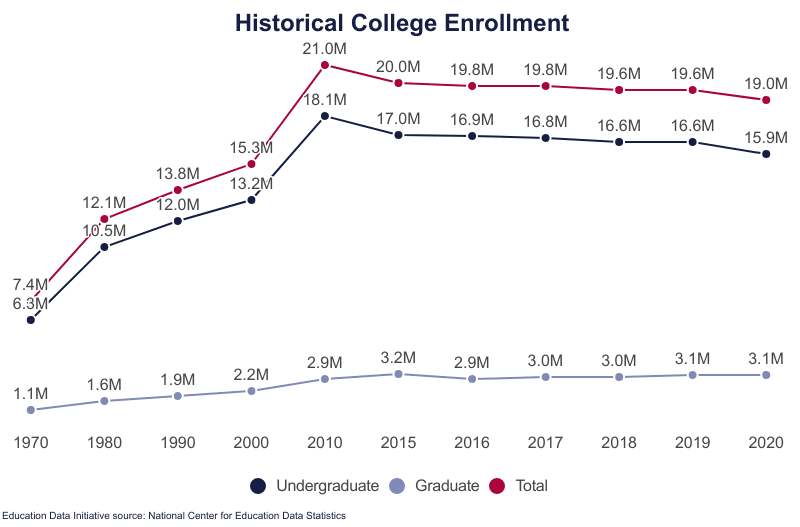
An oversupply of college seats is chasing a diminishing number of college bound high school students.  Undergraduate college enrollment peaked in 2010 (Education Data Initiative; see accompanying graph). 

 The percentage of high school graduates immediately enrolling in a four year college, approximately 44%, remained stable from 2014-2021l (the most recent year for which data are available). 

This declining enrollment meteor has been speeding toward colleges and universities for years.  It is, and has been, a known known.

What to do? A primary response by many institutions is to cut expenses. And, granted, many institutions likely have fat to trim. And, if done strategically, can be part of a comprehensive long term solution.  Unfortunately, my experience is that  budget cut mandates are not approached in a strategic manner.  The institutional plan (hallucination?) is to narrow the budget gap (crater) via cuts alone. Multiple times the provost ordered that I (along with all campus unit leaders/budget managers) cut X% from my budget. No guidance was provided other than a due date to return a budget spreadsheet with a bottom line that is reduced by X%. A key challenge is that higher ed budgets are dominated by personnel expenses. Copier paper and the like account for a negligible percent of the budget.  

During one mandated budget cut adventure (not at ONU), I eliminated the personnel line that supported my administrative assistant. Mature technologies -- I'm looking at you email and Outlook calendar invitations --  obsolesced most of the position's job responsibilities. (No, I didn't need someone to schedule meetings via multiple phone calls and then inform me of the meeting day/time via hand written note!) By eliminating this position, I retained monies in my budget to pay adjuncts that were teaching required course sections persistently enrolled to capacity; sections of program required courses for which we lacked full time faculty capacity to cover. Were these sections not offered, the alternative was to downsize the programs that require the courses. Downsizing the programs would have translated to revenue reduction far in excess of the cost to staff the sections with adjunct faculty. Serving our students by ensuring they can access the courses they need to progress through their program of study in a timely manner is a non-negotiable priority, in my world!

To be clear, strategic budget alignment, where budget is aligned with funding activities critical to mission, is an important tool. However, budget alignment must be done strategically. and it must be done as a complement to strategically driven activities that will s      

Strategic innovation must complement budget realignments. A process for making funding available proactively to fund creating an institution's future is essential.  Innovate! Be entrepreneurial! Create new value propositions. Develop new programs. For example, while at ONU, we identified need in the health sector for individuals with business acumen and life sciences understanding.  The Pharmaceutical & Healthcare Business major was launched to address this opportunity. The major also served as a retention tools for students that entered ONU's PharmD program, but subsequently discovered that the business side interested them more than the being a health care provider. Cultivate new markets. Differentiate. 

Alas, universities generally, and most in higher ed administration, are not entrepreneurial. Few know how to innovate; to create; to look outside the institution; to discover undone jobs to be done; to generate new revenue streams; to recruit the same kind of students to fill seats in legacy programs. Few in higher ed envision a future for their institution, college, or program beyond the status quo; they double and triple down on continuing to do what they have always done. Default mode reigns while the meteor zooms ever closer.

High sticker price, high discount pricing strategy is yet another meteor streaking toward these default mode colleges and universities. NASFAA reports (emphasis added):

the majority of undergraduate students grant aid, which were on average the largest recorded awards yet, with 90.9% of first-time undergraduates surveyed receiving institutional grant aid and 82.9% of all undergraduates receiving grant aid. That aid covered 62.1% and 57.6% of published tuition and fees, respectively. 

Put differently, 9.1% of first-time undergraduates and 17.1% of all undergraduates pay full boat sticker price tuition.  Put simply: a very few are willing to pay the sticker price for higher ed. 

The NASFAA report continues (emphasis added):

The survey of 341 private nonprofit institutions found a 56.2% average institutional tuition discount rate in the 2022-23 academic year for first-time, full-time, first-year students and a 50.9% discount rate for all undergraduates — the highest rates recorded.

Tuition is so overpriced that it is discounted an average of almost 60% to attract buyers! Or, rearranged, first-year students are paying about 40% of the published tuition rate. (Important note: these discounts typically do not apply to mandatory "fees" or to room and board; both are important revenue sources for many institutions).

Parents, at their peril, love to boast to peers about how many 'scholarship dollars' their (soon to be debt-ridden) son or daughter is being offered. "My kid is so smart she is offered a $xx scholarship! I prefer to think of 'scholarships' as tuition discount coupons.  Coupons that lower the price of admission, with the goal of increasing the likely you will attend.  (Perhaps in a future post I'll go into the sausage making of scholarship and financial aid awards).  

I have asked myriad admissions personnel: "Have you considered 'right sizing' tuition to reflect what students pay?"  Consistently I hear responses along the lines of we can't do that because ...
  • Parents gotta brag! Prospective students and their parents love the bragging rights about the scholarship amounts. We can't deny them that! And, it's great PR for us! 

  • A lower tuition would lower our perceived quality. Higher price equals higher perceived quality, don't you know! If the published tuition rate were lowered, especially if tuition is lower than competitor institutions, prospective students and parents will perceive we don't deliver quality degree programs.  
How to colleges and universities pay for tuition discounts? Returning to the NASFAA report (emphasis added):

... the majority of institutionally-funded grant aid (56.5%) came from undedicated sources of revenue, while 28.6% came from institutional reserves, and 10.4% came from endowment earnings and withdrawals. Another 4.6% came from gifts or fundraising efforts.

Colleges and universities typically build their budget showing tuition revenue at the tuition "sticker price". To "pay" for the tuition discounting (i.e., to acknowledge that the budgeted tuition revenue is overstated), to balance the institutional budget, a quarter of colleges and universities tap institutional reserve funds. Funds that otherwise could be used to fund innovation, faculty development, efficiencies, or  myriad other activities.  A funding strategy that weakens the institution's financial position. Reserve funds afford an institution resiliency in the face of unexpected events such as government mandated shut downs, unexpected building maintenance, or legal bills generated by an adverse personnel decision. 

Meanwhile many colleges and universities, and sadly ONU is a poster child, sit and wait. They watch the approaching higher ed meteors -- the enrollment meteor; the financial meteor, the pricing meteor, the campus culture meteor -- getting closer and closer.  

For some colleges and universities, it is too late. The higher ed meteors struck with fatal effect. Since 2020, 28 public or private nonprofit schools or campuses have closed or announced planned closures (source: BestColleges). 

The multiple meteors endangering higher ed rapidly approach ONU. Several of the higher ed meteors have made contact, as evidenced by ONU's current budget challenge (or perhaps more accurately 'budget crater'; this isn't ONU's first round of budget cuts requiring personnel reduction). Will ONU survive? That, is an open question.


12/04/2023

Back in the Bike Saddle After Eight Years - Gear Updates

On Sunday, July 5, 2015, I wheeled my Canondale CAAD10 road bike out of the garage, as I had many times that summer. I checked the tire pressure, adjusted my helmet, started Strava recording on my cell, and headed out.  It was a beautiful summer day. Not too hot with negligible wind (a rarity in Northwest Ohio). I aimed South, down the Slippery Elm multi use trail towards North Baltimore, has I had countless times before.  The out and back loop riding was peaceful, enjoyable and comfortable. 

One hour and 50 minutes, 29.6 miles, and 78 feet of elevation gain later, I was back in the driveway. Little did I anticipate that my next ride on the CAAD10 would be April 7, 2023, almost eight years later. A new job. A move to New England. Life intervened.  Over this period, I did enjoy a few off road trail miles on a fat tire bike. Through pine forests, Sandy soil. Good fun. Fresh air. But not the same as spinning out on the road.  

Job responsibilities no longer a constraint. Another move. This time to the familiar surroundings of mid-coast Maine. Spectacular scenery. Limited traffic. The CAAD10 beckoned to be ridden again. The yearning to feel the wind in my face and road unfold under my wheels reemerged. Time to ride again. 

April 2023. Almost eight years have elapsed since the CAAD10 and I last rolled. I'm now 62. I feel good. But what will it take to get my base back? I'm in decent shape from wrangling cords of firewood, and other household chores. But how will my body tolerate being back on the bike? Only one way to find out. 

Layered up, I rolled out of the drive way. The plan was a seemingly modest 8 mile loop. The air was crisp; in the 40s.  The snow bank lined roads were dry. Ah, the wind in my face! The sound of my wheels rolling over the pavement. After a slight downhill, the first climb arrived.  Shifting to my lowest gear, I worked up the hill.  Winded, I longed for lower gearing. Then down. Whew! Flat for a bit. Then down. Then up. Gear down, gear down, gear down.  Wishing I could gear lower. Legs straining.  Flat. Down. Slight rise. Climb. Although I've driven the loop many times before, I never appreciated the elevation change. Now, from the wheel of a car, does the roughness of the road surface, with many cracks and frost heaves, is not apparent. The hills, seemingly short but long enough to pose a challenge. Especially to legs with no base and bike gearing too high. Another climb. Lowest hear. Struggle. Made it. Flat. Whew! Slight down, then UP. Legs burning, lungs screaming, vision narrowing. I cleared the top of the hill, coasted down the short saddle before the climb resumed, and stopped. Plopping my exhausted self into the roadside snowbank, I phoned home to request a ride. 

Lessons were learned. Riding mid-coast Maine is different from navigating the flats of Ohio, home of the Hancock Horizontal Hundred, billed as the flattest century in the United States, it accumulates 434 feet. Total.  Wind is a near constant companion: sometimes it is a gift; oftentimes it is a curse. Spinning a groove for miles is common. Not here in the mid-coast where flat stretches rarely extend more than a quarter mile or so. Elevation change, up or down, is seemingly constant. 

To accommodate the realities of road cycling in Mid-Coast Maine, changes in training technique and gear must be made. I address training technique changes, adapted to the reality of my 62 year old body, in a subsequent post. First, I'll review gear updates made to accommodate the hills and rough roads that I now ride.  

To ease the hills, I lowered the gearing. I swapped the 11-26 rear cassette (perfect for the flats) for a SRAM 11-32 cassette. A SRAM Rival 22 Medium cage rear derailleur replaced the original derailleur with a cage too short to handle the 32 tooth cassette.  A new chain completed the drive line updates. New brake pads increased the odds I could stop. I also replaced the break and gear shift cables. 

Ohio roads and bike lanes are generally smooth riding. For as long as I can remember, 700x23 Continental GatorSkin tires have graced my rims.  They are durable and grip well in various weather conditions. However, rough roads and 23C tires are a challenging mix. Descending rough roads vigilant for road imperfections to avoid is neither fun nor comfortable.  I first updated to 25C GatorSkins. They provided some improved road shock absorption and road defect protection. But not as much as I had hoped. After a couple hundred miles, I upgraded to 28C Continental GatorSkins.  The 28s provide cushioning and road defect padding that let's me ride more comfortably and confidently when the road gets dicey. 

I've been riding since BC: before cell phone.  My bike electronics tell the tale. The handlebar mounted Garmin Legend H Handheld GPS Navigator, a ride recording, location confirming, direction providing companion since 2009, developed the infuriating habit of shutting off. Randomly. A cell phone in a  jersey pocket faithfully records my rides to Strava. Surveying the "bike computer" landscape in 2023 revealed a world very different than 2015, when I was last riding regularly. All sorts of devices now provide stem-top mapping, ride recording, Strava synchronization, bike data (e.g., cadence, speed; previously provided by mechanical devices), physiological data (e.g., heart rate), notifications of incoming calls and txt messages, etc., in one compact device. 

Wahoo ELEMNT Bolt V1 GPS Cycling/Bike Computer replaced the Garmin Legend.  This little wonder features a black and white display. I see no need for a power hungry color display. It has worked flawlessly. Every time. And I give kudos to Wahoo for the frequent, (possibly too frequent) software updates that are delivered to the device via WiFi. Slick!

To facilitate training, a Whaoo TICKR chest strap heart rate monitor, which connects to the Bolt via ANT or Bluetooth, replaced an ancient Polar chest strap heart rate monitor (that beeped when certain heart rates were realized, but did little else). The chest strap is as comfortable as one can be.  My first TICKR, after working flawlessly out of the box, refused to connect after a firmware update.  Wahoo declared the TICKR failed and replaced it under warranty. The replacement arrived in two days. And has worked flawlessly. Kudos to Wahoo customer support!

Whelp, that's the bulk of the CAAD10 refitting I've done so far. The CADD10 with SRAM Rival components and a compact crankset, purchased on occasion of my 50th birthday (do the math) is otherwise stock. According to Strava, I've logged a bit more than 3700 miles on the CAAD10. The rims are holding surprisingly well. Speedplay pedals round out the kit. The aluminum frame is surprisingly forgiving. The carbon fiber fork helps considerably. 

Please let me know your questions, suggestions, etc. 


1/21/2022

Teach Like a Champion 3.0

Many moons ago, I encountered Doug Lemov's book Teach Like a Champion.  Although the book compiles pedagogical techniques gleaned from teaching elementary and high school students, I found many of the techniques translated well to the undergraduate classroom. When associate dean, I provided each faculty member a copy of Teach Like a Champion.  The faculty self organized and held a series of brown bag discussions in which one or more of the pedagogical techniques were discussed and/or faculty shared their experiences applying one of the techniques.  

I learned that Lemov has just published Teach Like a Champion 3.0: 63 Techniques that Put Students on the Path to College. I look forward to getting a copy to experience this latest version of what I consider to be an essential pedagogical resource. 


94% of educators agree that video directly contributes to improvement in student performance

 So touts the eCampusNews

A new survey predicts that video in education will continue to grow, as a majority of educators say they believe video content is more engaging and effective than text-based content.

Yep, as a record number of courses went online or hybrid due to campus residency restrictions, faculty use of video in their courses escalated. Yep. And, anecdotally, students appreciate the ability to control the speed of video content and the ability to revisit video content as they wish. (Whether students engage video content in the first place, is a whole different matter). There is evidence that video course content positively impacts course completion rates. A key question faculty ponder: how to best leverage video as a pedagogical tool.   

However, the skeptic in me wonders if a study conducted by a company that provides video solutions  provides the guidance faculty seek.  

GO BIG: ASU's Thunderbird Seeks 100 million Learners by 2030

 Arizona State University is never shy about going big! Check this out:

The Thunderbird School of Global Management at Arizona State University plans to launch a new global management and entrepreneurship online certificate program that will offer five free online business courses in 40 languages worldwide and aims to reach 100 million learners by 2030, 70 percent of them women. 

The program was announced by the university Thursday and will be funded by a $25 million alumni gift matched by in-kind donations from the business school and the university, which will bring the business school at least halfway to the $100 million goal for launching the program across the next two years, said Sanjeev Khagram, dean of the business school.

Or is this vapor program/course-ware?  This, to me, is a big tell:

Khagram [dean, ASU's business school] said he is working with the university to ensure the certificate can be converted for college credits. 

In my experience this may be a surmountable hurdle, but many moons must first align.  

Will this certificate program get off the planning board? This will be fun to watch!   

4/04/2020

Covid 19 Resources

COVID-19 Resources

A compilation of COVID-19 data sources and analyses I have stumbled across.

Data


Analysis


Other

12/20/2019

Should a College Degree be Convenient?

The Jain Family Institute (JFI) just released a fascinating analysis and tool that explores, what they term, the geography of higher education access. The analysis is intriguing.  They develop a school concentration index (details here) utilizing zip tabulation area data. An interactive visualization tool accompanies their analyses. Impressive stuff!

Fundamental to the analysis is the fact that:
The majority — 56.2 percent — of public four-year college students attend an institution under an hour’s drive away, and nearly 70 percent attend within two hours of their home, according to the latest Higher Education Research Institute’s CIRP survey (via econofact). 
Interestingly, JFI's analyses, and the interactive graphic, enables visualization of concentration with a 30 min., 45 min., or 60 min. distance.  It would be useful to see the data for a two-hour drive radius.

Two key challenges I see with  the analysis published are:

  • First, geographic proximity is assumed to be essential.  This ignores online education opportunities available to part-time and full time students seeking higher education. The data for online programs suggest that most choose an institution geographically proximate. However, for online students. campus access is less important.
  • Second, students are assumed to be homogeneous;  segments within higher ed evidence important behavioral differences.  Students pursuing an associates degree via face-to-face courses, generally, are part-time students and commute to/from campus.  For this segment, geographic proximity is important to enable integration of pursuing an education with work, family, and other life activities.

    Students pursuing a bachelors degree on a part-time basis similarily benefit from geographic proximity of campus to home.

    Students pursuing a bachelors degree full-time come in two flavors. Flavor one is the 'traditional' college model in which the student lives on or near campus. Geographic proximity of campus to home is less critical. These are the students that, per the data above, likely live a one to two hour drive from home.  Full-time students that elect to live at home and commute to campus are a second flavor. These students can save a considerable amount by living at home. At many schools, the cost of room and board exceeds the cost of tuition (net not gross). For these students, geographic proximity (i.e., a commute of less than an hour is critical). Commuter students in a major metro area, such as greater New York City, have access to mass transit options (e.g., train) that are not available in less populous areas. 
Does convenience matter for students pursuing higher education? As with anything interesting, it's complicated. I believe the short answer is yes. But that requires acknowledging and factoring into the analysis important differences between student segments.  A drive distance that may deter a student interested in pursuing an associates degree part-time may be viewed positively by a student seeking to live on campus and pursue their degree on a full-time basis (think buffer from 'surprise' parental visits).  This requires that the data be modeled separately for each student segment.   

NOTE: My interest is in understanding factors that might inhibit academically qualified and financially capable individuals from pursuing higher education.


8/27/2018

Canon EOS 80D Initial Impressions

For the last decade (that's multi-centuries in techno land), a Canon EOS 40D has been my primary camera. For those interested in lineage, the 40D replaced a D60; a durable DSLR that my youngest daughter continues to use. It is REALLY impressive, amazing even, that a consumer electronic device is still functioning 1.5 decades of service later.  But I digress ...

Seeking better high ISO performance and the ability to explore shooting video, I picked up a Canon EOS 80D kit this past weekend at Costco (it is similar to this kit on Amazon.com). Although I don't really need additional lenses, Costco's price for the kit got me. The kit includes:

  • Canon EOS 80D Body
  • Canon EF-S 18-55mm f/3.5-5.6 IS STM lens
  • Canon EF-S 55-250mm f/4-5.6 IS STM Lens
  • 32 GB SD Card
  • Extra Canon LP-E6N Battery
  • Canon Instructional DVD
  • Voucher for a cleaning by Canon professional services
  • Canon camera bag (perfect for storing my 40D)
In short, the kit includes everything needed to provide a great starting kit for someone.  I'll see whether the lenses ever get used. The 18-55 is a very nice range for walking around. It's compact size is a plus. And it provides more at the wide end than does my Canon EF 24–105mm f/4L is II USM, a great "walking around" lens. I have yet to unbox the Canon EF-S 55-250mm F4-5.6 IS STM Lens and will likely eBay it. But, I digress.

First impressions of the 80D are very favorable.  Build quality seems very solid.  It is smaller than the 40D, which I like. My hands aren't that large. The 40D with grip always felt a bit big. The 80D is more comfortable for me to hold. It has a nice grippyness to it that inspires confidence. 

Controls are similar enough to the 40D that the learning curve is shallow.  It has been a quick transition. Yes, the on/off switch is in a different location. And, yes the 80D has more buttons, but the layout is logical and well thought out.  I especially like the location of the focus-point selection button. It makes changing the active focus point (or set of focus points) intuitive and easy.  The built in level is another nice feature. The in-viewfinder level feature is, based on initial trial, too finicky for practical use. Perhaps, with practice, it will become useful.

The swiveling touch screen is a nice touch. I'm still getting used to the touch features, but they are VERY handy.  

ISO performance is promising.  The 40D got noisy at ISO800 and ISO1600 was usable under very special circumstances.  The 80D, on initial trials, appears useful to ISO6400, and possibly above depending on conditions.   This means that routine shooting at ISO800 or ISO1600 is possible.  This low light performance opens interesting creative possibilities. 

The 80D's 45 focus points is a vast improvement over the center clustered short list of focus points. The 80D focus performance is fast and sure. So far, I've only tried single shot.  AI Servo mode trials remain.

Video? So far, I've shot but a couple minutes of exploratory video.  Too soon to render any opinion on that front. 

What else did I consider?  I carefully considered the Canon EOS M50. The feature set and the DIGIC 8 processor (vs the DIGIC 6 in the 80D) got my attention. But, ultimately, the diminutive size of the M50, it's lackluster battery life, and questions about AF performance with my L lenses and the adapter tipped me away from the M50 to the 80D.

So, there you have it. Very initial impressions of the Canon EOS 80D.  Image quality?  A topic of a future post when I have some samples to share. 


8/11/2018

Kindle Fire 7" tablet 2.5 Years In

About 2.5 years ago I shared initial impressions of the 7" Kindle Fire tablet. My impressions at the time were and remain mixed. The inability to run Google Apps remains a major annoyance and significantly limits the tablet's functionality.  A saving grace is that the Amazon App Store distributes the INO Reader and SONOS apps.  Critical in my world.  And the battery would last almost a week of normal usage.

About a month ago, the Fire's battery life took a dive.  The battery drains rapidly, even when the device is not in use. The tablet must be tethered constantly to use-enabling power cord.  Very frustrating. But not unexpected. Another Kindle Fire that graced the Digito Household experienced a similar sudden departure from utility. Sigh.  Based on these experiences, it is unlikely another Kindle Fire will cross my threshold.

In case you are wondering about the iPad 2 ... well, it still lives. Sort of.  It is glacially slow. Ya gotta love Apple's strategy of fatally crippeling devices that are otherwise functional. It lives on the handle bar mount of the bike on a trainer and serves (sort of) as an entertainment device. I say, sort of, because the only app that works with some dispatch is the timer app.  At least I know how long I've spun the pedals.

While we're on the subject, a Samsung Tab A 8" tablet has been my workhorse tablet for the past couple years.  The size is great for many applications, including running the fabulous Navionics Boating USA HD app when sailing Meridian.

Costco is currently running a killer deal on a Samsung Tab A 10.1" tablet. I couldn't resist and ordered one. It should arrive early next week.  I look forward to having more screen real estate available for route planning and for Kindle books that have lots of detail, such as Nigel Calders's classic and enormously useful Boat Owners Mechanical and Electrical Manual 4/E.

Not so Quicken

Whoo boy! I've been a Quicken and Quicken Bill Pay user for over three decades. Like many, I would update every two or three years. Intuit's annual incremental upgrades were never too dramatic. The accumulation of two or three years of incremental upgrades generally yielded a useful improvement in my user experience.

In April 2016, H.I.G. Capital acquired Quicken from Intuit. The Notorious H.I.G. promptly switched business models from the legacy shrink-wrap physical product in store shelves to a subscription model. In effect, Quicken has always been a subscription product. Typically, connectivity services would go dark after three years. A functionality loss sufficiently aggravating to inspire splurging on the latest Quicken version. Thus restarting the cycle. The Notorious H.I.G. transitioned Quicken to an annual subscription service. Akin to Adobe Creative Cloud, software functionality ceases absent a current subscription.

I had Quicken 2017. The Notorious H.I.G. established end of life at April 30, 2020. I fully intended to milk this version for all it was worth. I'm not one for conspiracy theories, but it was oddly coincidental that, each Quicken 2017 update brought significant technical issues. The most annoying was an issue that prevented entering the password needed to download transactions. A fresh install fixed the issue. But my confidence was shot.

And what should magically appear in my inbox but an offer for a two year Quicken Premier subscription at a 40% discount. Intriguingly, the Quicken Premier subscription includes Quicken Bill Pay. I've been paying forever $9.99 a month for Quicken Bill Pay. Two years of Quicken Bill Pay exceeded the cost of the two year Quicken subscription. Hmm .... that got my attention.

Curious, I contacted Quicken support. If I subscribe to Quicken Premier, will my existing QuickenBillPay account stitch over and the monthly charges stop? Yes, I was assured, they would.

So I took the plunge on June 30, 2018, and ordered up a two-year subscription of Quicken Premier. The download and install of Quicken 2018 happened as one would expect. No surprises. All accounts loaded, banks connected, etc. All seemed OK.

A couple weeks later, a $9.99 charge for Quicken Bill Pay appeared in my bank account. Puzzled, I again contacted Quicken customer support. The perky customer service rep. admonished me, "Oh, no, you must cancel your old Quicken Bill Pay account and create a new Quicken Bill Pay account. And here's a URL pointing to the details you need." Gee, thanks! Would have been great if the customer service dude had shared that keen intel last week.

So, I initiated creation of a new QuickenBillPay account. Entered payment account info and, sat back. A perky email promptly arrived informing me that two micro deposits will appear in the account in approximately 48 hours. Enter those amounts to finalize account registration. Swell!

When the micro deposits failed to appear after a week, I again contacted Quicken customer support. The very helpful individual quickly diagnosed that I made an error when entering the account number. He stepped me through the simple process of establishing another payment source with the correct account information. He promised that he micro deposits needed to confirm the payment source would appear within 48 hours.

Fast forward another week, the micro payments are still M.I.A. I placed another call to Quicken customer support. Now, the Quicken Premier subscription includes "Priority access to customer support." Quicken appears to consider a 25 minute wait time "priority access." Nonetheless, I eventually connected with another perky customer service rep.

She asked: Have you submitted a voided check?

Me: Um, no, I've not been asked to.

She: Well, you need to. Here's how to submit your voided check ...

Me: Oh, OK.
She: We are backlogged and the micro payments won't appear in your account for 12 to 14 days.

Me: Oh, swell. Oh, by the way, two days ago, I was charged for QuickenBillPay. I cancelled that. 
She: Oh, that was your final payment. 
Me: Oh, swell, so far I've been charged about $20 for an account I thought was closed. Quicken has disabled all payment accounts attached to that QuickenBillPay account. At the moment, I have no online payment service active.

She: Would you like me to reactivate your old account?
Me: Um, no. Thanks. 

So, here we are, six weeks after activating my Quicken Premier subscription, still dorking around finalizing configuration of my QuickenBillPay service. To be continued, I'm sure.

Not so Quicken.

11/22/2015

Amazon Kindle Fire Fire: Not bad for $50 If you Can Manage the Frustrating Limitations


A 7" tablet is, in my personal device ecosystem, an essential device. It is my go-to device for reading news (thanks to the Inoreader Android App), managing email, keeping up with the Delos crew on YouTube, and controlling my multi-speaker Sonos system via the Android Sonos Controller App. My iPad 2 goes largely unused except when in situations where WiFi is not available and its 3G capability keeps me connected.

When my beloved Nexus 7 bricked, the new Amazon Fire 7" called my name. At $50 per unit, or six for $250 (buy five get a sixth free), Amazon hits a compellkng price point for a 7" tablet. It's an impulse buy. A "why not?" A "nothing to loose" and (possibly) much to gain value proposition. But is it?

The specs are promising. The screen is crisp (171 ppi / 1024 x 600).  The 1.3 GHz quad-core processor is capable. The 8 GB of on-board storage can be expanded to 128 GB by addition of a micro SD memory card. Lots of storage head-room there. And, in the field, the battery yielded full day use. Yep, lots to like. (For full specifications go here).

The operating system, a variant of Android, is much more Androidish than the first generation Fire Tablet. Amazon's take on the Android OS has a custom launcher that ties the Fire tightly into the Amazon ecosystem. One screen displays recent activity, including books read, movies watched, apps, etc. That recently used page proved useful. Another launcher page displays all installed apps. The remaining launcher screens are devoted to pitching Amazon content (books, audio books, movies, apps, games, etc.). Indeed, on powering up the device one is greeted by a pitch for a app or other goodie available from Amazon. In short, this tablet has a lot going for it. And at $50 a compelling impulse buy.

The Kindle Fire 7" is tied to the Amazon app store.  If you intend to consume Amazon content exclusively, that works well. The Amazon app store is stocked with myriad apps beyond Amazon's. However, the collection is unpredictable. And this unpredictability may prove to be a deal breaker (or force purchase of a different tablet). For example, the GoPro app is not in the Amazon app store. Neither is the lovely Wunderground weather app. On the bright side, the Sonos Android Controller app is available from the Amazon App store. And, oddly, the Amazon app store includes the NetFlix app (a direct competitor to Amazon's Prime Video), but does not stock the YouTube app.

The Amazon app store's limitations loom largest if, like me, you are thoroughly integrated into the Google ecosystem. The Amazon app store stocks none, nada, zip, zero of Google's fantastic Android apps. No Gmail, no Drive,  no Pictures, no Sheets, no Calendar. No YouTube.

As workarounds, the Amazon app store includes apps that are pointers to full screen browser sessions for Gmail, Calendar and YouTube. While a step in the right direction, these bookmarks are less than ideal if you use Google services.

The Kindle Fire ships with native email and calendar apps. The email app lacks the email sorting functionality that make the Gmail app so useful, and renders email a useful tool. The email app that ships with the Kindle Fire 7", because it lacks the magical email sorting functionality that Gmail and Inbox execute so well, managing daily email, given my typical volume is not possible. The calendar app that ships with the Kindle Fire 7" is serviceable.

How does the Kindle Fire 7" function as an Amazon consumption device?  I'm not a big movie watcher and play no games, so no insights are available on those fronts. The Kindle reading experience is, oddly, challenging. I found it challenging to access the menus without flipping several pages back and forth in the process. My Kindle PaperWhite provides a much more satisfying, and less frustrating, reading experience.

After using the Kindle Fire 7" for two weeks, with growing frustrations due to the lack of Google apps, I yielded to the call of an Acer Iconia Tab 8 while making a CostCo run.  Early impressions are very favorable. The screen is fantastic! It provides a fairly straight-up Android 4.4 experience. One concerning factor is that Acer is providing no guidance on whether and when Android updates will be available. Having experienced the ugly side of upgrading too soon, I'm currently happy with the rock-solidness of Android 4.4 Kit-Kat. We'll see how it performs over time.

Meanwhile, please share in the comments your experiences with the Kindle Fire 7" or the Acer Iconia Tab 8.

6/28/2012

Reflections on SCOTUS' ACA Decision

Some reflections on today's SCOTUS decision re. the Affordable Care Act follow:

  • The "individual mandate" provision is unconstitutional when viewed through the lens of the Commerce Clause. The prevailing justification provided when the law was created and sold to the public was thus deemed out of bounds.
  • The "individual mandate" provision is Constitutional if construed as a "tax." SCOTUS apparently applied the "duck test" to reach this conclusion (i.e, if it waddles like a duck, looks like a duck and quacks like a duck, it must be a duck). 
  • The determination that the individual mandate is a tax directly contradicts President Obama's assertion  that the individual mandate is not a tax and makes clear that the ACA imposes a huge tax increase on much of America (or at least the minority of Americans that actually pay income taxes). One gets the impression that the "liberal" justices, joined by the Chief Justice, were at pains to make obvious the President's lie.
  • The court's finding that the mandate is a "tax" reveals that the intent of the Affordable Care Act is to raise revenues for the government; not to make health care affordable. 
  • The tax determination fits the stereotype of President Obama as a "tax and spend liberal."
  • The tax determination will likely afford the Tea Party with renewed energy, enthusiasm, and focus, especially for Tea Party rallys already scheduled to occur in conjunction with Independence Day celebrations. 
  • A majority comprised of "liberal" and "conservative" justices converged on the decision that the individual mandate is a tax.  This "bipartisan" majority has the potential to nullify (or confuse) critics prone to characterize the decision as "partisan politics." 
  • SCOTUS severely limited powers under the Commerce Clause with regards to provisions of the ACA that would discontinue a state's Medicare funding if it did not comply with federal government mandate. 
Taken all together, SCOTUS' decision appears to have the potential to create more challenges for the Obama administration than it resolves.  On balance, the decision seems to afford critics of the ACA greater traction than is provided supporters of the ACA.  The decision also streamlines messaging objectives for opponents of the ACA in a way that makes it more difficult to message support of the ACA. It will be fun to observe how this unfolds in the coming weeks and months. @AnnAlthouse summed all this up with her concise Tweet: 

My view of the Obamacare case in 2 words: President Romney.

12/04/2011

Useful iPad Apps

To complement my list of useless iPad apps, here's a list of useful iPad apps ... apps I use daily. The list is in no particular order:
  • Google search for iPad. Love the hands-free voice search feature. Beyond search, this app also provides a portal to all of my Google App services. One negative is that the Google Search app does not afford easy switching between Google accounts.
  • Safe Gmail for the iPad. This app provides for easy switching between multiple Google accounts. A real frustration reducer.
  • Gmail for the iPad. If/when Google enables quick account switching, this will be my go-to app for email. On the margin, the archieve and trash icons are too close together. It is too easy to trash a message by mistake.
  • MobileRSS for the iPad. I keep hoping that Google will publish a reader app that is as convenient as the Google Reader for Android. Until that happens, MobileRSS, is my go to feed reading app. MobileRSS integrates seamlessly with my Google Reader account. It also makes sharing posts via Twitter , email, Facebook, etc. a simple two-tap process.
  • Safari. Safari is an OK browser. The recent addition of Chrome-like tabs is a mixed blessing. The tabs use precious screen real estate. I rather liked Safari's previous "view all open windows" navigation scheme.
  • WSJ for the iPad. Because of this app, I now prefer to read the Wall Street Journal on my iPad, rather than the dead trees version. Dow Jones is to be commended for this!
  • DrudgeReport for the iPad. What can I say?
  • Facebook for iPad. This app is better than accessing FB via Safari, but that's not saying much.
  • Twitter for the iPad. As with the FB app, the Twitter iPad app beats accessing Twitter via Safari. However it's annoying and confusing to use. Why, for example, is the compose new tweet button located at the bottom left of the window?
  • WeatherBug for the iPad. My favorite weather app.
  • Google Maps. Gmaps on the iPad is just as useful as it is on the Android platform. Endless fun.
  • Google Earth. Ditto. Fun to pinch to zoom and swipe to relocate the earth.
  • Netflix. Gotta have it.
  • Kindle for the iPad. Essential for accessing and reading our household library of Kindle books.
  • Kno Textbooks. Useful for organizing technical reports and other documents in PDF format.
The iPad's lack of Flash support means that I cannot access the vast media library that accompanies my Amazon Prime account and makes impossible use of the myriad websites that use Flash.

See my companion post: Useless iPad Apps.

Useless iPad Apps

An iPad 2 (32 GB with Verizon 3G) has been in my bag for about six months. I use the iPad for:
  • Email. The iPad makes for an OK email device. Editing typos remains more difficult than with an Android device. Android provides a convenient way to locate an insertion point. iOS does not. The lack of SWYPE for iOS makes text entry more tedious than necessary.
  • Reading books and technical reports.
  • Reading blogs and news sources.
Here's a run down on the iPad apps that I've found to be useless (as in I've never used them or rarely use them):
  • Messages (New with iOS 5. I have now clue what it does).
  • Videos. Never used it.
  • iTunes. Ditto.
  • Photo Booth. Huh?
  • Photos. Why?
  • Music. How different from iTunes?
  • Face Time. Google + hangouts and Skype are better.
  • Mail. Awkward.
  • Calendar. Apple FINALLY added the ability to use swipe gestures to change months, etc. Generally awkward to use.
Most of these apps reflect Apple's legacy approach to content. Apple has historically assumed content is loaded on the device. In contrast, I operate in a cloud based environment. Google Apps is my primary tool for personal and work email, etc. iOS5 is a step in the cloud direction.

See my companion post Useful iPad Apps.

Overall, it's an OK device. Android provides a superior user experience. iOS lacks key information display features (such as widgets). And I find more consistency across Android apps than I find in Apple Apps.

8/03/2011

Adobe Turing Test Fail

In anticipation of updating my Adobe Creative Suite, I probed the Adobe.com website in search of a chart that compares the myriad CS suite versions. Failing to find the chart, or any other tools useful for comparing Adobe's various CS5.5 suite offerings, I initiated a chat with Adobe's sales support system expecting a quick and direct answer to a simple question. As the chat transcript below reveals, Adobe's automated customer support chat service is unhelpful and fails the Turing test:

Please hold as we route your chat to an Adobe Representative.

Welcome to Adobe.com! My name is Robin. May I assist you with your selection today?

Robin: Hi, How are you doing today?

rob: i'm seeking a chart that compares the various 'suites'

Robin: I'll be glad to help you with that.

Robin: For me to assist you better, can you tell me what kind of tasks would you like the software to help you accomplish?

rob: i have 'cs3 design premium' installed now. curious how the various bundles compare.

Robin: I'm afraid, just to clarify, when did you installed 'CS3 Design Premium'?

rob: don't know an exact date. it's been a while.

rob: the website used to have a link to a chart that compared the contents of the various bundles. it was very useful. i'd like to find it again.

Robin: I'm sorry, you're using older version of the software, Adobe released new version of the software CS5.5.

rob: my question is about cs5.5

rob: is this a turing test fail?

Robin: Let me explain you clearly.

Robin: Rob, CS5.5 Design Premium includes Dreamweaver CS5.5 for web site designing, Photoshop CS5 Extended which will help you in editing photos in more advance way, Illustrator CS5 to create images for printed productions and logos, InDesign helps you to designs and publishes documents for print , Acrobat X Pro to edit, create, manage and convert PDF file and all Flash related software.

rob: please point me to a chart that compares the different CS5.5 suite offerings.

Robin: Please give me moment.

Robin: Please click here

Robin: Did you get the link?

rob: yes, thank you. that is exactly what I was seeking.

Robin: Lets go ahead and placed the order, okay.

Robin: Rob, are we still connected?

Robin: I haven't heard from you in a while. Would you like to continue chatting?

Robin: I'm sorry, we have not heard from you. We're happy to help. However, if you do not respond soon, this chat session gets terminated automatically.

rob: all purchases must go through our purchasing office

Robin: I can understand you're concern, is there any thing else?

rob: and all vendors must be able to articulate the significance of the number 42 in Douglas Adams' The Hitchhiker's Guide the the Galaxy.

Robin: Thank you for visiting Adobe.com today! Please come back online if you need any assistance. We will be happy to help.

Robin: We'd like to hear your comments. Please click on the 'Close' button in the upper right corner and take a moment to complete a short survey. Thank you! Have a Nice Day!


The convoluted grammar, and the repeated failure to respond appropriately to my specific questions, leads me to wonder: Does Adobe have a strategy of actively discouraging people from learning about and purchasing their products? As I've used Adobe products for more than 20 years, this is very disappointing.


6/05/2011

First Look at the Kno iPad App: WTF?

Kno set out to reinvent the textbook with a proprietary hardware/software solution. After the iPad took off Kno did a hard pivot to become a software solution. Yesterday, Kno rolled out the Kno iPad App. After taking the Kno iPad app for a spin, all I have to say is: WTF?

Remarkably, the Kno app has a WTF button. The WTF button concisely sums up my impression of the Kno app. WTF? An app targeted to the primary, secondary, and higher ed market has a WTF button? We all know that WTF is short hand for what the fuck. Right? Um, not in Kno-land. In Kno-land WTF stands for Words To Friends. Huh?

What else does the Kno offer? Stickies and highlighting! Who-hoo! The ability to add notes and to highlight key passages are basic study tools. The highlight tool worked intermittently for me. Can I search my notes or highlighted passages within a book? Across all of my Kno books? Unclear. I can with the Kindle app.

Navigation within a book? I like the option of chapter level navigation and to then drill down to sub sections within a selected chapter. The Kno lacks, as far as I can tell, chapter level navigation. Navigation occurs via a tedious page oriented nav system in which each page is represented as a rectangle with the page number on it. Chapter home pages are designated, but selecting them simply takes you to the first page of the chapter. The sample Psychology text included with the Kno app download, has chapter front pages formatted with what appear to be links to the section. Nope, they are faux links. WTF?

How do book and PDF files render in the Kno app? OK. At times, pages of the sample textbooks would render larger than the screen of my iPad 2 and no amount of shaking, pinching, or flicking would readjust the page to fit the screen properly. I find the Kindle App provides a better reading experience.

Can the Kno reader play interactive media? It appears it cannot. Kno appears locked into a vision of textbooks locked into the dead tree text era. WTF?

The Kno app offers an academic calendar metaphor for grouping together books or materials rendered in PDF format. Assets can be grouped into Courses. Courses can be grouped into terms. This organization seems appropriate only for courses that have relatively few assets.

Ultimately, the Kno app appears to be little more than a ebook store. One can purchase books from the Kno store that are downloaded into the Kno app. Presumably, these books are accessible exclusively via the Kno app. Pricing? I shopped the Kno Bookstore for several titles I use in my classes. In each case, Kno is offering the book for the full sticker price of the dead tree edition. WTF?
Let's take a look at how the Kno fares against my eTextbook dream criteria:

1. Device independent? No. the Kno currently lives on the iPad exclusively.
2. Platform independent. No. iOS only.

3. Consistent reading experience. As the Kno is iOS only this is an n/a

4. No connection required. Yes. Once material have been downloaded to the iPad, an active internet connection is not required.

The Kno App scores a one out of a possible four.

Another challenge facing the Kno is that it does not appear to interact with learning management systems (LMS). For the Kno to be useful in the higher ed context, it is essential that faculty can distribute class assets via the LMS and that students can easily pull those assets into their working environment. The Kno App appears to be an island in a land of LMS connectivity.

Ultimately, the Kno App's value proposition eludes me. Why would anyone purchase etext (or other) books from the Kno Bookstore as opposed to, say the Kindle bookstore or CourseSmart? The Kno App offers no apparent distinctive difference that enhances value to students, faculty, or institutions.

Don't Kno.

6/02/2011

eTextbooks: A Wish List

Kindle at the Barnes & Noble CafeI'm a fan of ebooks. My Kindle Reader is my primary reading device for trade books. Text books, and some professional research books, render better on my . The iPad's larger screen and color display is a better fit for rendering tables and figures. Many eTextbooks are not available in Kindle format. For eTextbooks, published on proprietary platforms such as CourseSmart, a tablet device provides a reading experience vastly superior to reading texts on a laptop, netbook, or desktop machine.

I prefer to purchase digital books in Kindle format for three key reasons:
  1. Purchase ease: Amazon.com provides an excellent shopping experience.
  2. Safe keeping: Amazon.com stores my ebooks so I always know where to find them.
  3. Ubiquity: I can read Kindle format books on every digital device I own: my laptop, my netbook, my iPad, my desktop machine, my Droid X Android phone.
  4. Future proof. I have confidence Amazon will make it possible for me to read my Kindle books on any device I may own in the future.
A recent email exchange with Steven Joos, Product Development Manager for 4LTR Press | Cengage Learning, suggests that some textbook publishers misunderstand the Kindle platform. Text publishers appear to equate Kindle with the Kindle device. Viewed narrowly, I agree that the original Kindle, due to its 7" screen, does not provide an optimal textbook reading experience (I've not tried reading texts on the larger Kindle DX, which seems a better fit with textbooks).

Texbook publishers appear to misunderstand (or prefer to ignore) is that Kindle is a publishing platform that integrates acquisition and distribution to almost any device a person is likely to own and use. If textbook publishers were to prioritize market access, the Kindle publishing platform would seem to have much going for it. I am confident that 100% of my students own one or more devices that support the Kindle platform.

Cengage dismisses the Kindle as incompatible with how students use text books; claiming that the Kindle is too linear. This video is offered as evidence of the superiority of Cengage's proprietary etext publishing platform. Perhaps I'm missing something obvious, but the video seems to confirm that the Cengage platform is (a) linear and (b) offers functionality very similar to that of the Kindle platform. The Kindle apps enable jumping around a text, search, highlighting, etc. The key features demonstrated in the cengage video. I do appreciate that the Kindle publishing platform has some limitations with regard to incorporation of interactive elements. Consequently, the Cengage claim of platform superiority of the Kindle platform appears without merit.

As a faculty member, the proliferation of ePublishing formats discourages adoption. I presume my students have a similar reaction. Keeping track of which platform I must access to use a particular text book -- must I log onto the publisher's website? do I use a dedicated app? what device do I have to use? -- is a distraction. The CourseSmart delivery platform offers less functionality than I experience with the Kindle platform. Flat Earth publishing offers wonderful customization features, but is weak on delivery options. The demise of the Kno Tablet illustrates the hazards of device dependence.

My take is that the textbook publishers efforts to develop proprietary eTextbook distribution systems is retarding, rather than encouraging, eTextbook adoption. By focussing on developing proprietary publishing platforms (i.e., by decreasing compatibility), textbook publishers are increasing complexity and failing to leverage ubiquity of availability (a key relative advantage of eTexbooks). The net result is to diminish customer value of eTextbooks relative to traditional dead tree textbooks.

My dream eTextbook (one I would readily recommend to my students) is:
  1. Device independent. I can read my eTextbooks on every device I own today or may own in the future; I'm not locked to reading the eTextbook on a specific device.
  2. Platform independent. I can read my eTextbooks using any OS platform.
  3. A consistent reading experience across devices and platforms. I want a similar reading experience and suite of reading tools (e.g., search, highlighting, etc.) now matter the device or platform on which I read an eTexbook.
  4. No connection required. Affords the ability to use materials when not connected to the internet. Yes, internet connectivity is near universal, but it is not universal. I want to know that I can read my eTextbooks anytime anywhere I happen to be and have a device available.
At present, the Kindle platform appears to be the publishing solution that comes closest to delivering on my dream list.